
How do I login using a recovery code?
If your authenticator device is not available, you can login using a recovery code.
1. Enter your email address and password on the Wordsynk login page.
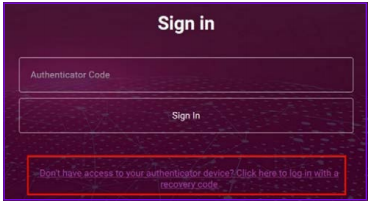
2. Click Don’t have access to your authenticator device? Click here to login with a recovery code.
3. Enter one of your recovery codes and click Sign In.
Note: Each recovery code is unique and for single use only.
Note: You will not be able to access the application without first being authenticated. In the Sign in with recovery code page, you will be presented with the option Have access to user authenticator device? by clicking on this link you will be redirected to the Sign in with authenticator code page.
Comments
0 comments
Please sign in to leave a comment.